
Hostinger has established itself as one of the most popular web hosting providers globally, as reflected in various Hostinger reviews and user feedback, offering an impressive balance of affordability, performance, and user-friendly features. With over 3 million customers across 150+ countries and recognition as one of Europe’s fastest-growing companies by the Financial Times and Hostinger Google reviews, it has become a benchmark in the budget hosting segment. This comprehensive review examines every aspect of Hostinger’s hosting services, from performance metrics and security features to pricing structures and customer support quality.
A] About Kinsta
Kinsta has established itself as a managed WordPress hosting provider, offering Google Cloud infrastructure with developer-focused tools. Kinsta reviews frequently praise its dashboard but criticise base limits that drive add-on sales.
Founded in 2013 after starting as a marketing firm, Kinsta grew into a global host backed by M-One Capital, trusted by 120,000+ businesses. It serves high-traffic sites via the MyKinsta dashboard and boosted C3D regions with SOC 2/ISO 27001 compliance, though customer reviews of Kinsta note resource complaints.
B] Kinsta Plans and Pricing
This Kinsta review explores diverse managed WordPress plans for single or multiple sites, with Kinsta pricing starting at $35/month (1st month free on select) but scaling via visits/storage limits. Add-ons like Redis ($100/site/month) and disk space ($20/20GB) inflate costs.
Single-Site Plans
Best for one high-traffic WordPress site; lower tiers suit blogs but cap resources tightly.
| Plan | Price (Monthly/Annual) | Storage | Visits/Mo | Server Bandwidth | CDN Bandwidth | PHP Threads |
| Single 35k Visits | $35 ($30, $350 annual) | 10GB | 35,000 | 40GB | 125GB | 2 (256MB each) |
| Single 125k Visits | $90 ($75, $900 annual) | 10GB | 125,000 | 250GB | 500GB | 6 (256MB each) |
| Single 1.25M Visits | $625 ($521, $6,250 annual) | 15GB | 1.25M | 750GB | 1,500GB | 10 (512MB each) |
Multiple-Site Plans
For agencies managing 2+ installs with multisite support.
| Plan | Price (Monthly/Annual) | Storage | Installs | Server Bandwidth | CDN Bandwidth | PHP Threads |
| WP 2 | $70 ($59, $700 annual) | 20GB | 2 | 40GB | 250GB | 2 (256MB each) |
| WP 10 | $225 ($188, $2,250 annual) | 40GB | 10 | 250GB | 750GB | 4 (256MB each) |
| WP 40 | $675 ($563, $6,750 annual) | 60GB | 40 | 750GB+ | 1,500GB | 6 (256MB each) |
WordPress Hosting
Kinsta for WordPress includes edge caching (300+ POPs, 50% speed boost) and APM tools, but bans most cache plugins and limits uncached requests via PHP threads. Key Kinsta hosting features include:
- One-click staging: 1 standard environment included (1 core/8GB RAM); $20/month premium staging for mirrored live resources and up to 12 CPUs.
- MU plugin for caching: Built-in Must-Use plugin for server-level purge control and automatic cache clearing.
- Continuous MySQL optimisation: Automatic weekly database fine-tuning to maintain performance.
- SAML SSO, API, unlimited users: Enterprise-grade security, REST API for automation, and no-cost collaborator access.
- Multisite on higher plans: Available on Single 65k (and above) or Pro plans; not supported on the Starter 35k plan.
C] Performance Analysis: Speed, Uptime, and Load Handling
Server Response Time and Speed Tests
Kinsta performance review credits Google Cloud C3D boosted regions for solid speeds, with CDN boosting 50%. Kinsta load times suffer on dynamic sites without $100/month Redis, as PHP threads (2-10) handle uncached requests only.
Average TTFB improves via edge caching, but 256MB PHP caps limit queries. Concurrency bottlenecks hit lower plans.
Uptime Performance
Kinsta uptime review confirms up to 99.99% SLA on eligible plans, backed by DDoS protection. Sites stay online past limits with overage notifications at 80%/100%. LXD containers and monitoring contribute to reliability.
Load Test Results
Lower plans exhaust PHP threads under concurrency; $625/month tiers need add-ons for WooCommerce. Visits count unique IPs/24hr.
D] User Experience and Control Panel
MyKinsta Dashboard
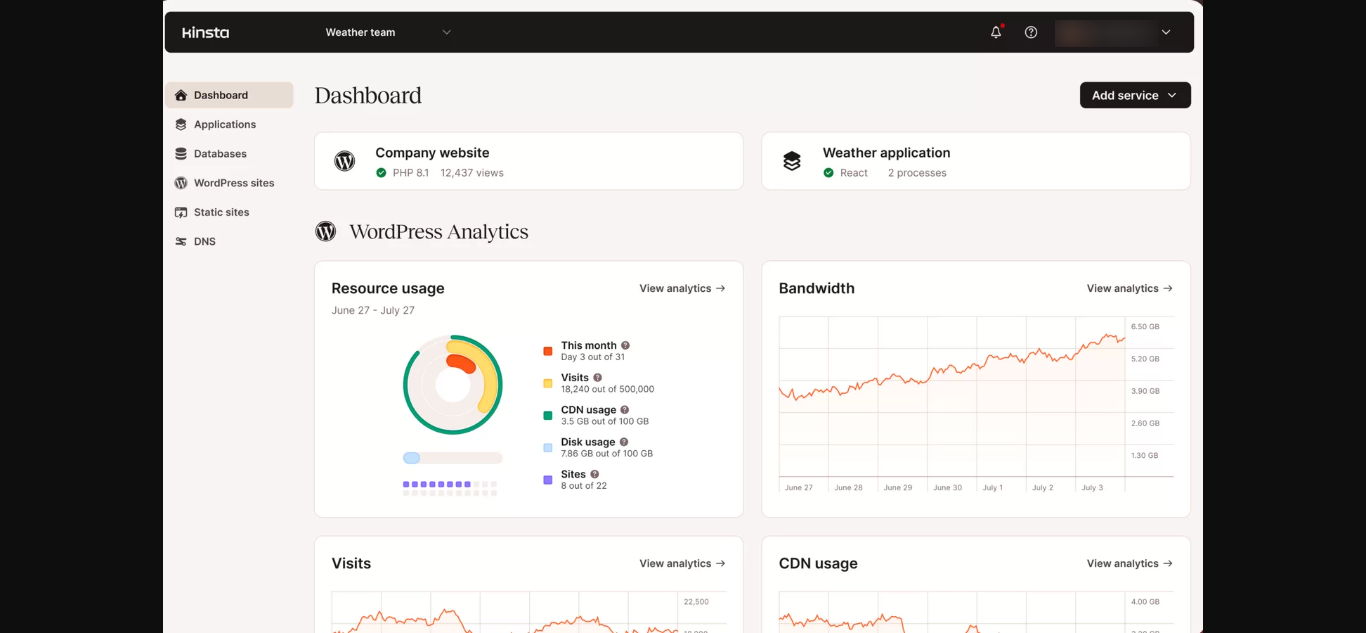
Kinsta dashboard provides analytics, PHP tweaks, and resource views. Kinsta’s ease of use aids developers via API/cloning.
Key features include:
- Unlimited users/role access
- Cache rules, PHP restart
- Visit tracking
- One-click staging/cloning
- APM bottlenecks
E] Security Features
SSL Certificates: Free wildcard SSL auto-renewal. Kinsta security uses a managed WAF.
DDoS Protection and Firewall: Cloudflare Enterprise DDoS + Google Cloud firewall; proactive threats.
Malware Protection: Unlimited free removal by specialists.
Additional Security Features
- SOC 2/ISO 27001
- Disabled risky PHP (exec/symlink)
- 2FA/IP banning
- No security plugins needed
F] Data Centres and Server Locations
Kinsta server locations use Google Cloud globally, with 260+ CDN POPs. Boosted C3D AMD EPYC for speed.
Current Data Centre Locations
- Asia: Google Cloud regions
- Europe: Multiple boosted
- Americas: US primary
G] Customer Support
Support Channels: 24/7 chat in 5 languages; tickets. Kinsta customer support is human-only for 120,000+ clients, no phone/AI.
Support Quality: Kinsta support reviews expert responses; account managers on agency plans.

H] Backup and Migration
- Backups: Daily auto (14–30 days retention based on plan); extras $20/6hr or $100/hr/site/month. External backups to AWS/Google Cloud available ($2/site + $1/GB). Unlimited free WordPress migrations for all sites.
- Free Website Migration: Managed by Kinsta’s expert team with zero downtime guaranteed.
I] Refund Policy
30-day money-back guarantee applies to all plans. First month free available on select tiers (Single 35k and WP 2). Annual billing saves 2 months’ cost; payments via cards or wire/ACH (for annual). PayPal is not accepted.
J] Pros and Cons
Advantages
- 99.99% uptime SLA eligible plans
- 260+ CDN POPs, 50% speed boost
- Unlimited free migrations/malware removal
- Developer API/APM/SSO
- Agency directory/unbranded WP
- Kinsta pros and cons suit agencies
Disdvantages
- 10GB starter storage, 256MB PHP limits
- Add-ons needed ($100 Redis, $20/20GB disk)
- No email; Route 53 DNS
- Overages on visits/storage
- Kinsta vs WP Engine: Higher cost, similar limits
- No phone; annual renewal jumps
K] Who Should Choose Kinsta?
Ideal For:
- Agencies with multiple sites
- Developers API/staging
- Kinsta for WordPress high-traffic (add-ons)
- Static eCommerce upper plans
Less Suitable For:
- Budget (Kinsta for beginners is a little costly)
- Dynamic WooCommerce no Redis
- High-concurrency base plans
Final Verdict
Kinsta review 2026 delivers strong infrastructure (99.99% SLA, fast CDN) but relies on add-ons for scale, per Kinsta user reviews. Verified $35+ pricing with 10GB/256MB caps suits agencies, not dynamic sites. VPS alternatives offer transparent value for most.